portwalker: TCP Port Scanner from Scratch
Multi-threaded TCP port scanner and service fingerprinter, written in pure Python with no third-party dependencies. A hand-built alternative to nmap -sT -sV, built to understand what a port scanner actually does under the hood.
Overview
portwalker is a multi-threaded TCP port scanner and service fingerprinter written in pure Python with no third-party dependencies. Point it at a host, give it a port range, and it returns the open ports along with the service banner each one announced on connect. It’s a from-scratch alternative to nmap -sT -sV, built so I would actually understand what a port scanner does under the hood, not just what it prints to the terminal.
Why I built it
First mission in a longer cybersecurity learning track I’m working through. The deal I made with myself: don’t just learn the security tools, build them. Sockets, threading, and the conversation between a scanner and an unfamiliar service are the foundational layer for everything else in offensive security work. Writing one from scratch in a couple hundred lines of Python forces you to understand each of those layers in a way no walkthrough tutorial ever does.
What it does
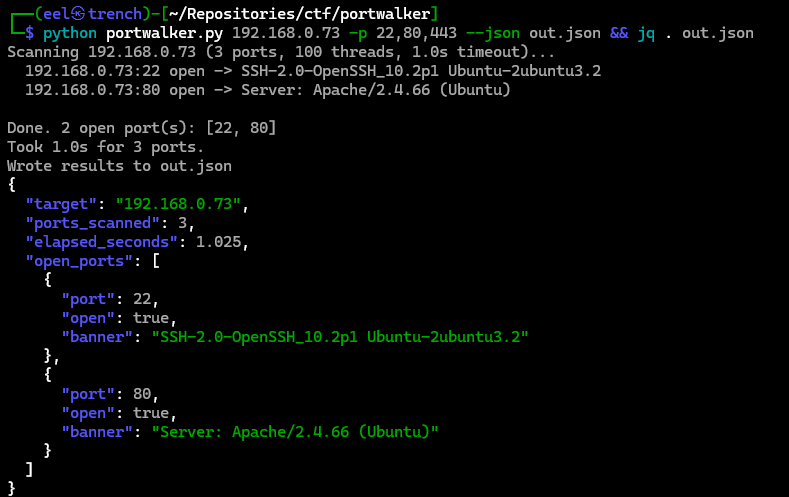
The scanner concurrently dials each target port over TCP. If a connection succeeds within the configured timeout, it reads whatever the service announces first (the banner) and parses out the useful fields. SSH, HTTP, and FTP banners are recognized and pretty-printed; anything unfamiliar falls back to the raw response. The full report can be written to JSON for piping through jq or feeding into the next tool in a workflow.
Concurrency is handled with a thread pool, so a 1000-port scan finishes in about a second on a reachable host. Configurable knobs cover the port range (single ports, ranges, or a mix), thread count, socket timeout, and output mode.
Show, don’t tell
A real scan against scanme.nmap.org, the public sandbox host that exists specifically for scanner practice:
$ python3 portwalker.py scanme.nmap.org -p 1-1000 --threads 100
Scanning scanme.nmap.org (1000 ports, 100 threads, 1.0s timeout)...
  scanme.nmap.org:22 open -> SSH-2.0-OpenSSH_6.6.1p1 Ubuntu-2ubuntu2.13
  scanme.nmap.org:80 open -> Server: Apache/2.4.7 (Ubuntu)
Done. 2 open port(s): [22, 80]
Took 1.2s for 1000 ports.
JSON output piped through jq for downstream tooling:
$ python3 portwalker.py 192.168.0.73 -p 21,22,80 --json out.json
$ jq '.open_ports[] | {port, banner}' out.json
{ "port": 21, "banner": "220 (vsFTPd 3.0.5)" }
{ "port": 22, "banner": "SSH-2.0-OpenSSH_10.2p1 Ubuntu-2ubuntu3.2" }
{ "port": 80, "banner": "Server: Apache/2.4.66 (Ubuntu)" }
Demo
A 90-second walkthrough: scanning a host, grabbing banners off SSH, HTTP, and FTP, and piping JSON through jq.
What this taught me
- The actual mechanics of a TCP connect scan: how the three-way handshake completes, why timeouts are tunable, and what happens when a port is closed versus filtered.
- Banner grabbing as the foundation of service fingerprinting. Most services announce themselves on connect; the work is parsing them consistently across protocols.
- Python concurrency in the wild: thread pools, lock-free output, and the cost of contention when thread count exceeds the kernel’s connection-tracking budget.
- The legal and ethical guardrails. Scan only systems you own or are explicitly authorized to scan. The public sandbox at
scanme.nmap.orgexists precisely so people like me can practice without crossing that line.
Stack
Python 3.8 or newer. Standard library only: socket, concurrent.futures, argparse, json. Tested on Kali, Ubuntu, and macOS hosts.