PCB QC: Automated Optical Placement Check
Automated optical QC for the sensor PCB from my lab. Camera in a light-tight fixture, classical CV pipeline, ten placement measurements per board, PASS/FAIL in a few seconds. Replaces a hand-caliper step that was slow and error-prone. Ships as a PyInstaller Linux app with CI-built releases.
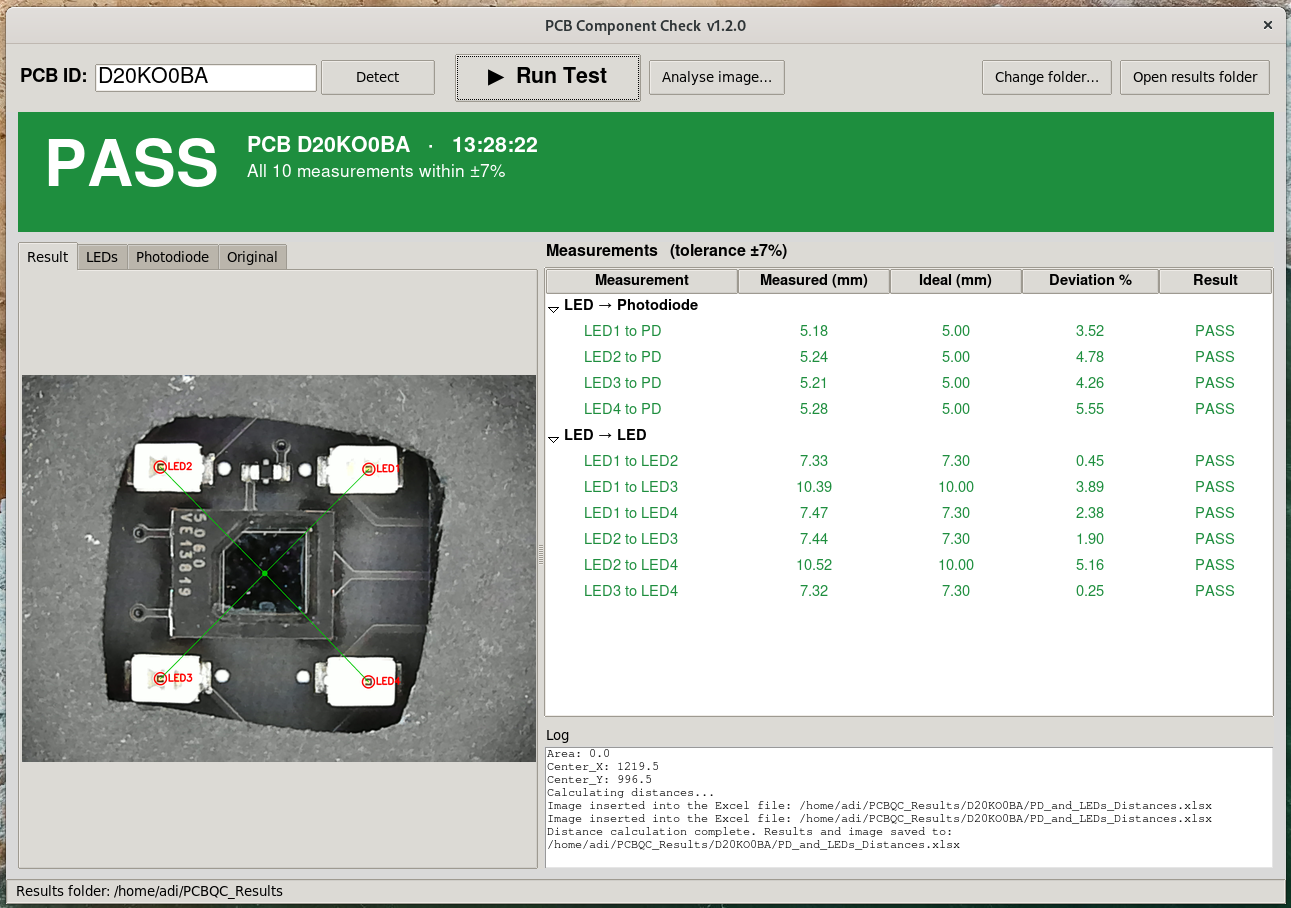
Overview
An automated optical QC system for the sensor PCB from my lab. Photograph the board in a light-tight fixture, locate the four LEDs and the photodiode, measure their positions in millimetres, and give the operator a PASS or FAIL in a few seconds. Replaces a hand-measurement step that used to take minutes per board and was error-prone. Ten placement measurements per test, each compared to a design value, with a configurable tolerance.
Why I built it
The lab produces sensor PCBs in small batches. Every board needs to pass placement QC before it goes into a device: are the four LEDs and the photodiode within tolerance of their design positions? For a while the answer was “grab a caliper, measure by hand, log it in a spreadsheet.” Slow, easy to mis-transcribe, no image record for later debate.
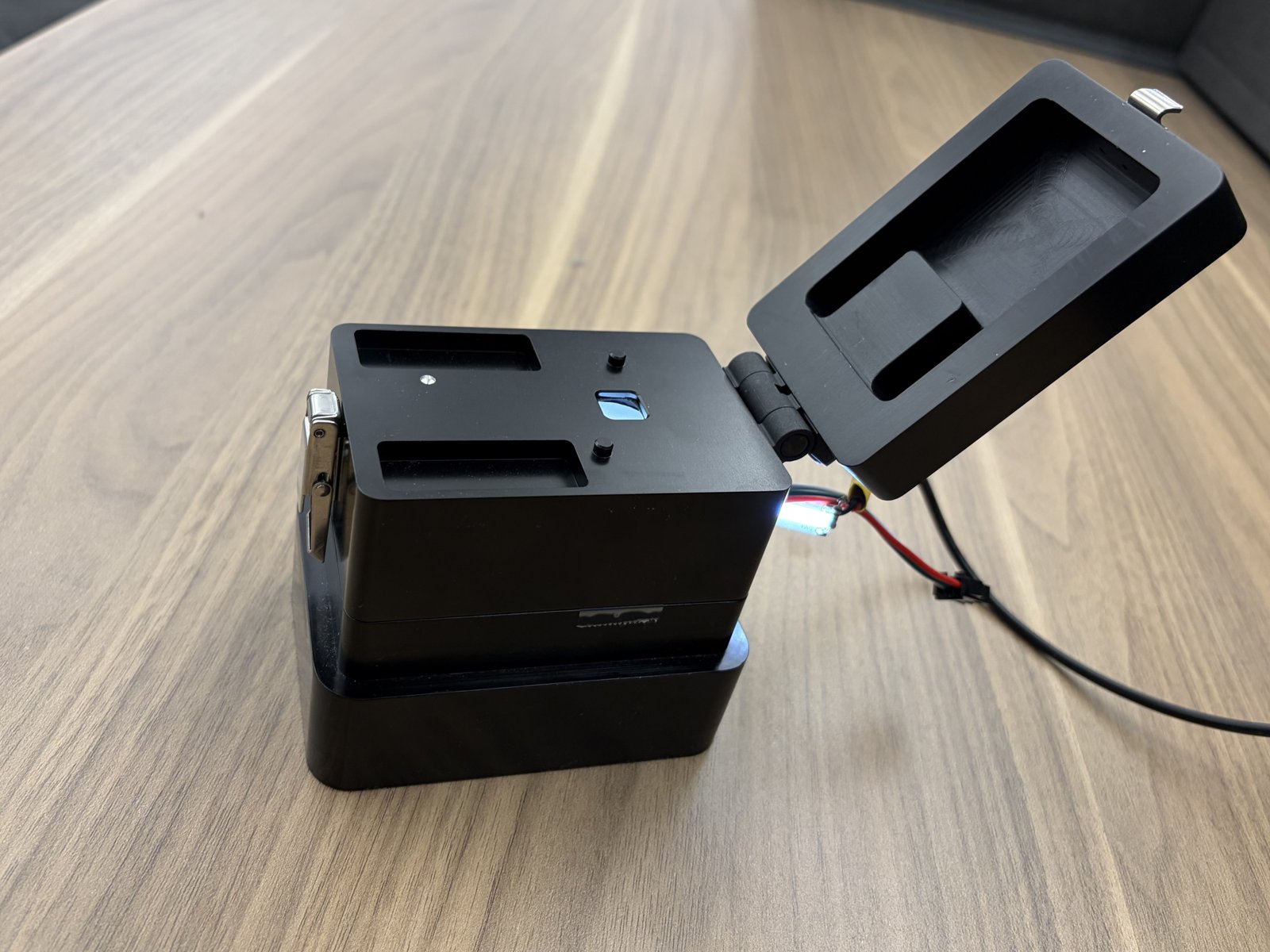
So I built the tool I wished existed. A metal fixture (a machined enclosure with a hinged, latched lid), a 5 MP camera underneath, a Python pipeline running classical computer vision, and a tiny Tkinter GUI that gives operators a big green PASS or big red FAIL. Every test also produces an Excel report, an image archive, and a CSV log entry with traceability by board serial number (auto-read from the PCB’s FTDI chip).
What it checks
Ten placement measurements per board. Each reading must be within ±7% of its design value (configurable). All ten must pass for the board to pass.
| Check | Readings | Ideal |
|---|---|---|
| LED centre to photodiode centre | 4 (one per LED) | 5.00 mm |
| LED to LED | 6 (every pair) | 7.3 mm sides, 10 mm diagonals |
Individual thresholds live in pcbqc/config.py, so tolerance can tighten as the process matures.
The fixture
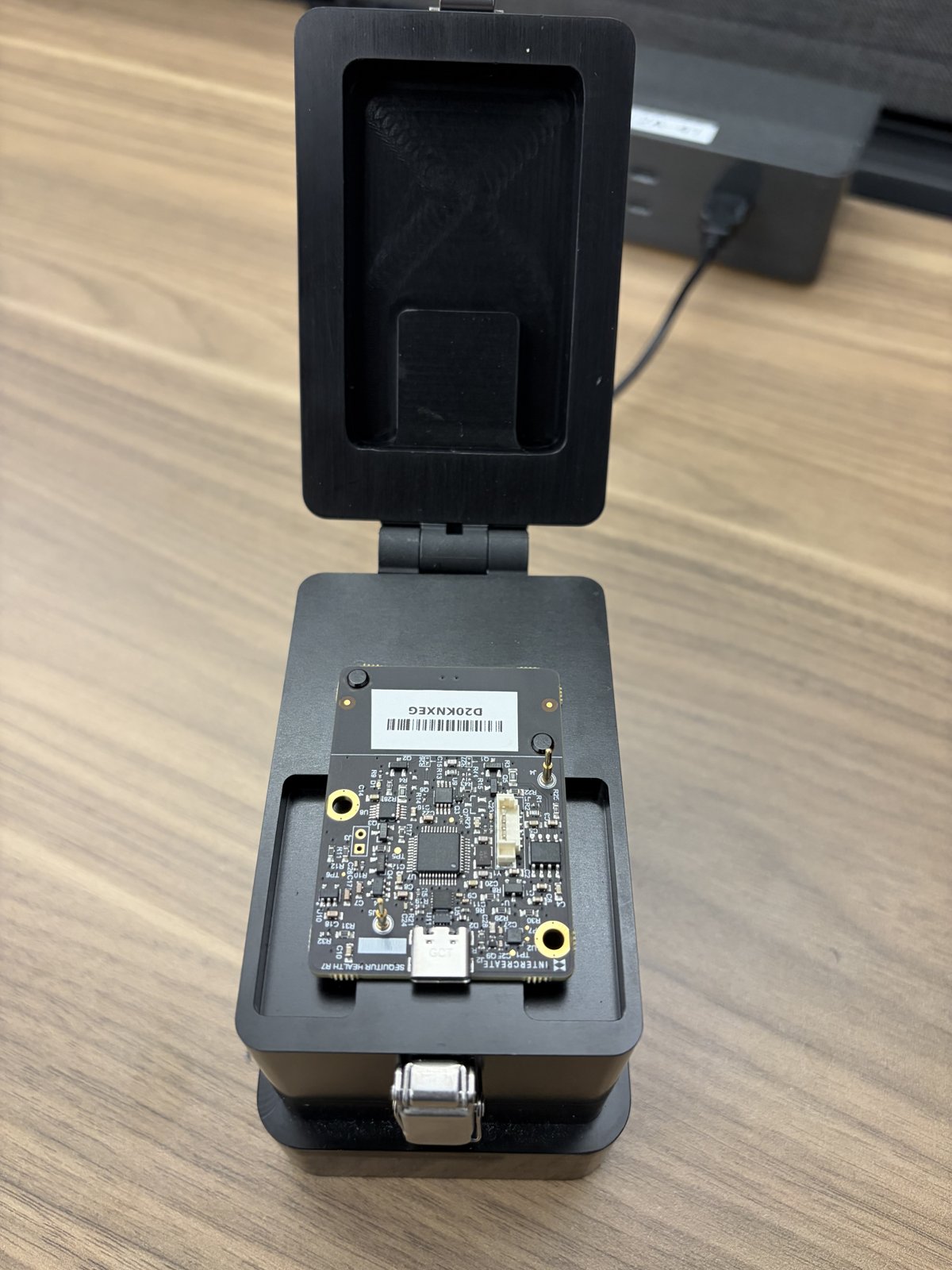
Machined black aluminium enclosure with a hinged, latched lid. The PCB drops onto locating pins over a window. Camera and white LED lighting are sealed inside, so ambient light doesn’t influence the image. The e-con Systems See3CAM CU55 (5 MP, AR0521 sensor, 2592 × 1944) sits underneath, USB to the host PC.
How it works
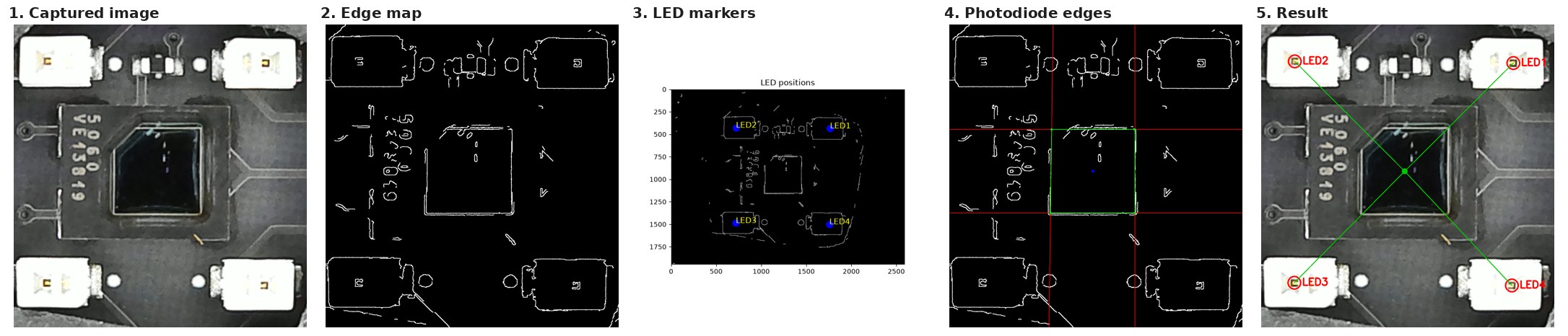
Classical computer vision, one image at a time. No ML in the pipeline. The geometry is fixed and the visual features are engineered targets, so hand-tuned algorithms are more predictable than a trained model would be here.
- Capture a full-resolution frame from the camera.
- Edges: Canny edge map with thresholds auto-set from the image median.
- LEDs: find the square marker on each LED, one per quadrant. Gaps in an outline are closed automatically.
- Photodiode: Hough-transform edges of the die outline, searched around the centre of the LEDs. A faint fourth edge is completed from the other three.
- Measure: pixel distances × calibration (mm/pixel), compared with the ideal values.
Calibration is a one-time step: image a known-distance target, compute mm/pixel, store the constant.
Three outcomes, one screen
The GUI shows exactly three states: PASS, FAIL, NO RESULT. Ambiguity is the enemy of a QC tool that a non-engineer operator has to trust in five seconds.
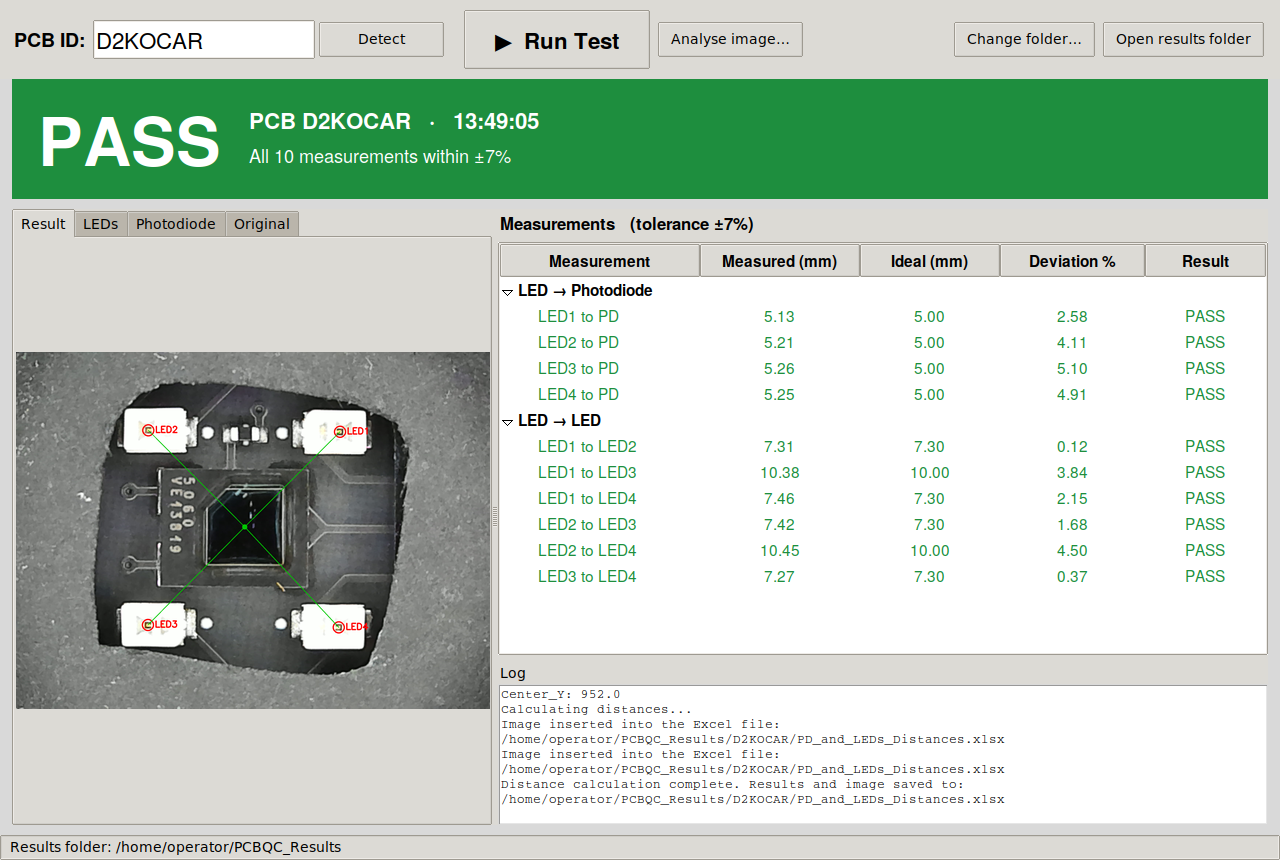
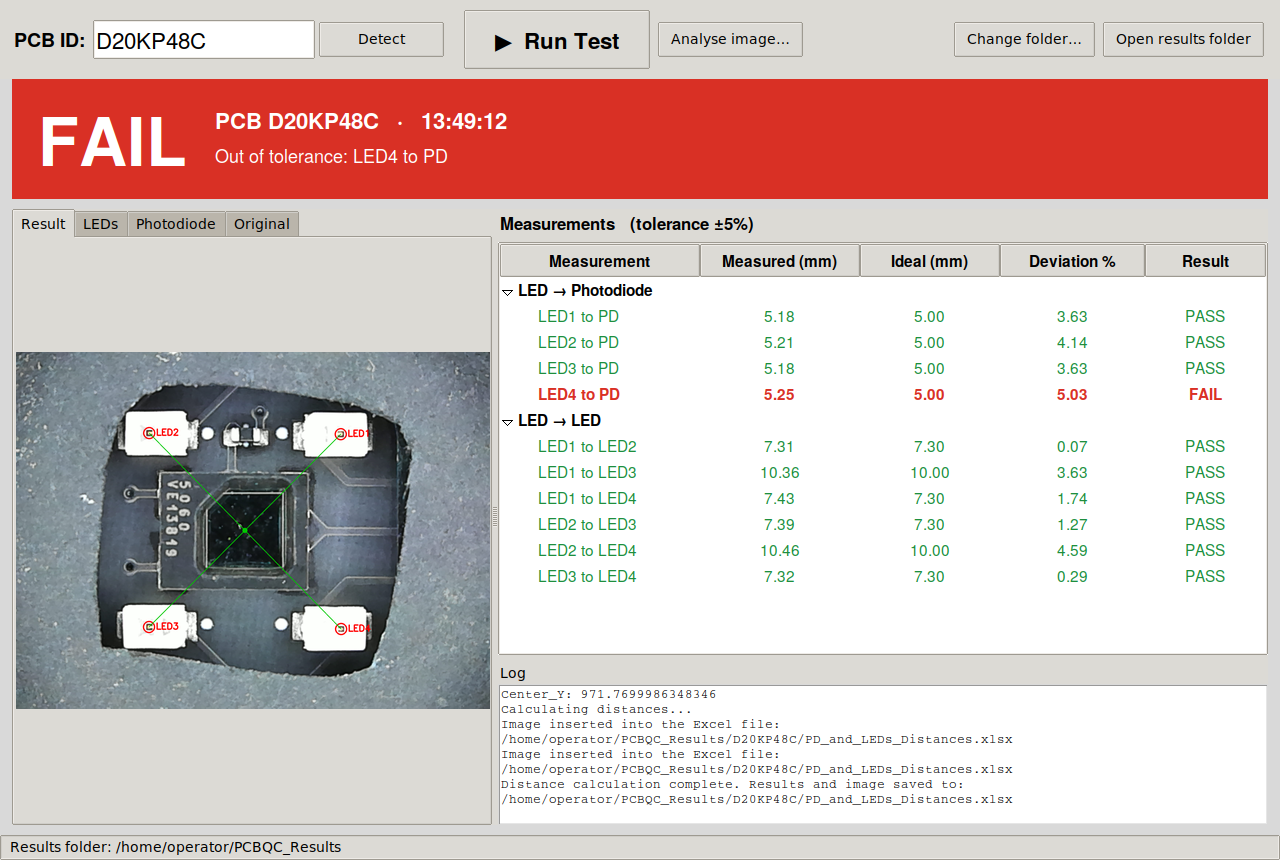
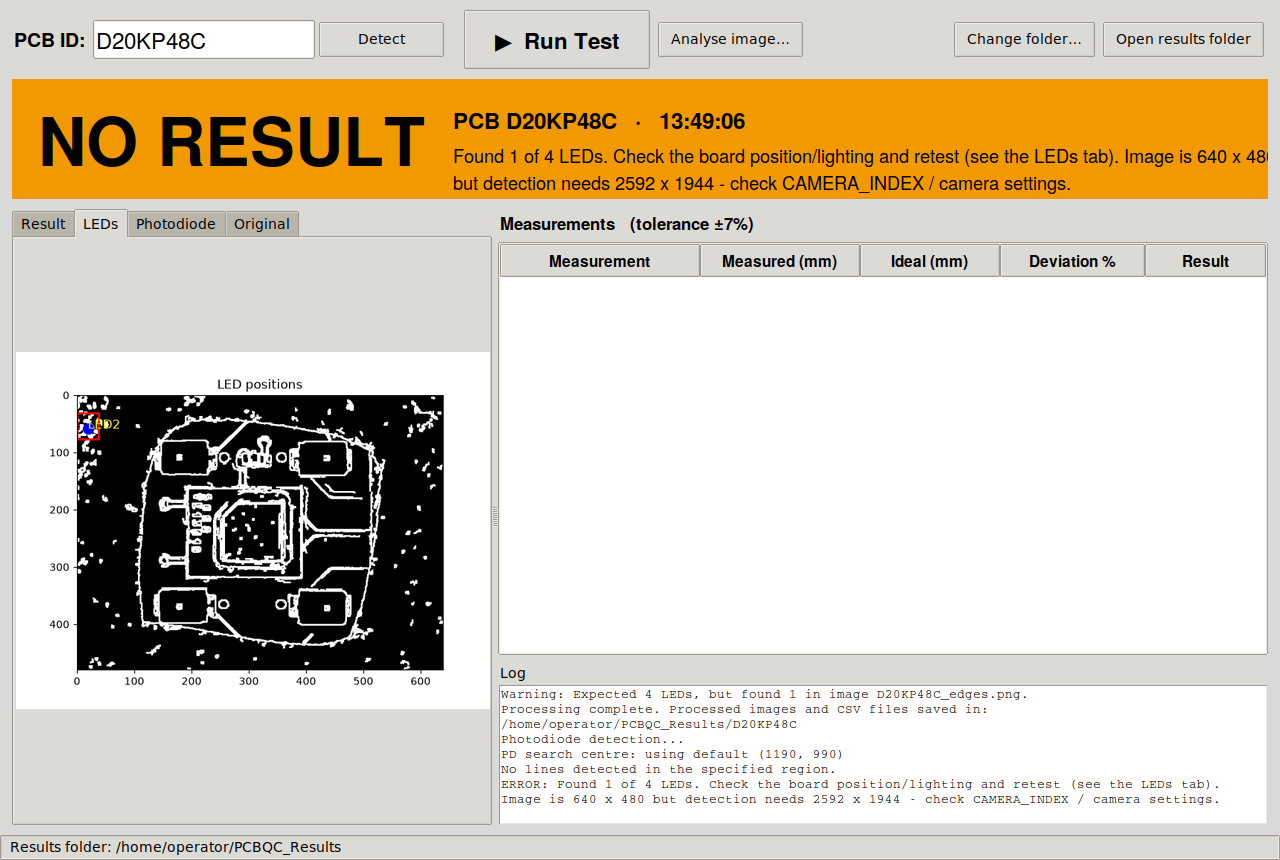
Every test writes to ~/PCBQC_Results/<PCB ID>/ with raw images, CSV data, and an Excel report. Every test also appends a line to test_log.csv for traceability.
What this taught me
- Fixturing is half the problem. A “hard” computer vision task becomes easy when you control the lighting, the camera, and the object’s position. The enclosure was as much of the work as the code.
- Classical CV still wins when geometry is fixed. Canny + Hough beats a trained model on this problem because the features are engineered targets under controlled conditions. Predictable, tunable, debuggable, no training set required.
- Auto-tuning thresholds matter. Canny’s low/high thresholds set from the image median (instead of hardcoded values) mean the algorithm survives lighting drift and small camera changes without recalibration.
- The operator UI is the product. A test that finishes in 400 ms but takes 30 seconds to interpret is worse than a slower tool with a clearer verdict. Big green PASS. Big red FAIL. Nothing between.
- CI plus PyInstaller equals a deployable Linux app. GitHub Actions runs the tests on every push and builds a tarball on version tags. Operators install a ready-made app; no Python knowledge needed. Bridging “code that works on my laptop” and “app the QC tech uses” is where most side projects stall, so it was worth the effort here.
- Traceability is boring and non-negotiable. Board serial number auto-read from the FTDI chip, timestamped test folder, appended log line. Every test is auditable. This is what “medical-grade” ends up meaning at the bench: no test is lost, every result has provenance.
Stack
Python 3.10 or newer, OpenCV for the computer vision, Tkinter for the operator GUI, openpyxl for the Excel reports. GitHub Actions for CI (Linux x86_64 and ARM64 builds triggered on version tags). Packaged with PyInstaller into a single Linux tarball; a desktop shortcut installer completes the experience.